Rocket Docs
Hybrid Serverless and Zapier Middleware
Hybrid Serverless and Zapier Middleware
Objective
The objective of this proposal is to outline the development and implementation of a middleware layer that facilitates data synchronization and communication between multiple systems, including Xero, ServiceM8, a CRM system, and a third-party design software. The middleware will enable the sharing of contact and job information, real-time updates on job statuses, and the exchange of critical reports related to solar installations.
Project Overview
This middleware aims to bridge the gap between these systems, ensuring seamless data flow, real-time updates, and enhanced efficiency in solar installation projects.
Technical Approach
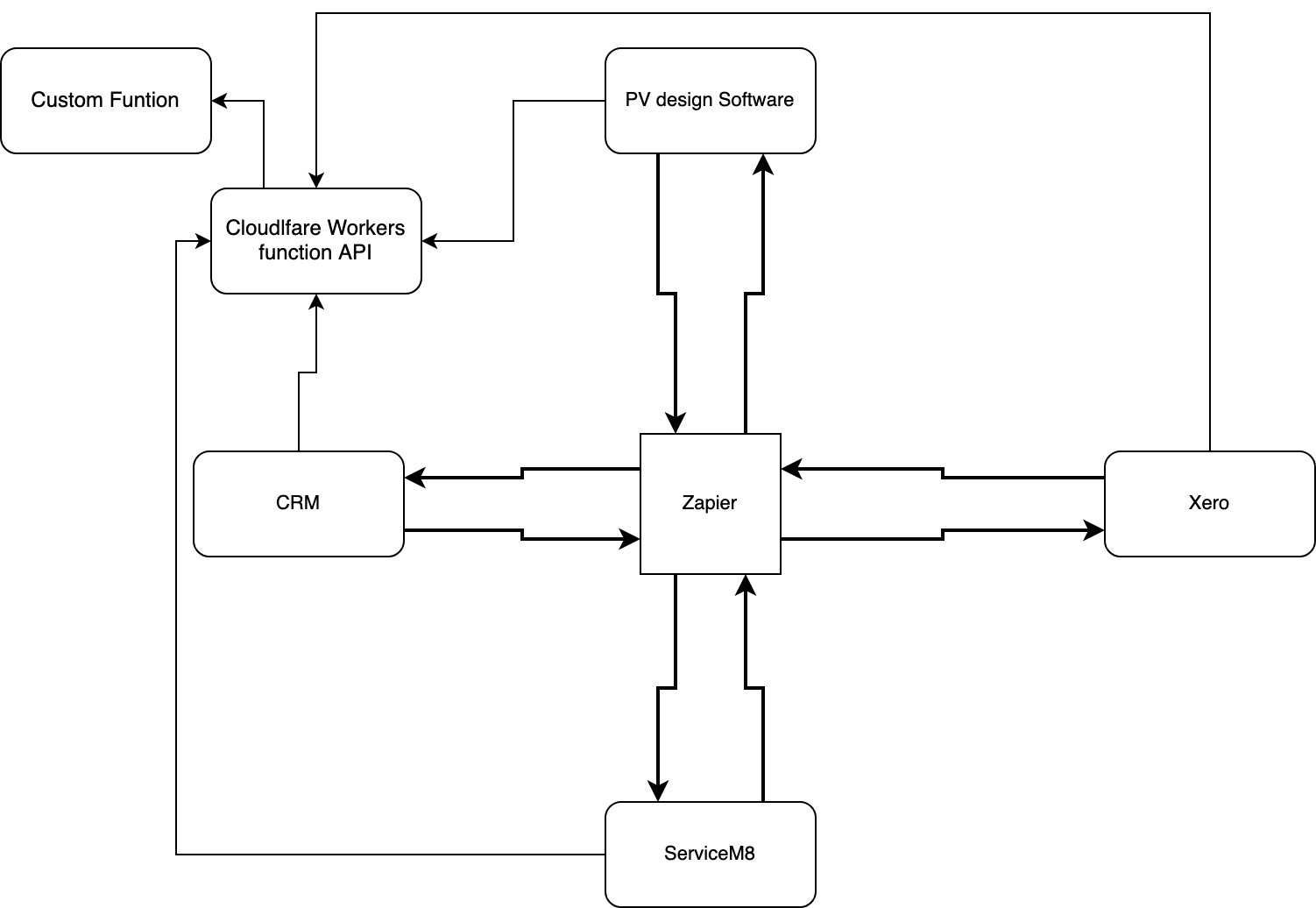
Integration Points with Zapier
To simplify and speed up the development process, the middleware will use Zapier for integrations wherever possible:
- Xero Zapier Integration: For syncing invoices and payments
- ServiceM8 Zapier Integration: For real-time updates on job statuses
- CRM Zapier Integration: For sharing customer information
Custom Serverless API for Specialized Integrations
For systems that can't be directly integrated through Zapier, a custom serverless API will be developed:
-
Third-Party Design Software Integration: To enable seamless data sharing with the design software, the middleware will provide an endpoint to receive design-related data, including project specifications and requirements. It will validate and transform this data as needed before forwarding it to the appropriate systems.
-
Reports Sharing: The middleware will facilitate the exchange of critical reports, such as G99 compliance reports and DNO (Distribution Network Operator) documentation, between systems. Automated report generation and distribution will be a key feature.
This I believe could be made part of zapier too with the right PV design software.
Data Mapping and Transformation
The middleware will perform data mapping and transformation to ensure that data from various systems is harmonized and compatible. This includes standardizing data formats and resolving data conflicts.
Authentication and Security
Robust authentication mechanisms, including OAuth and API keys, will be implemented to secure the communication between systems. Data encryption will be applied to protect sensitive information in transit.
Monitoring and Error Handling
Comprehensive monitoring and error handling mechanisms will be in place to detect issues, log errors, and trigger notifications when data synchronization failures occur. Automated retries and data consistency checks will be implemented.
Monitoring and Error Handling
Comprehensive monitoring and error handling mechanisms will be in place to detect issues, log errors, and trigger notifications when data synchronization failures occur. Automated retries and data consistency checks will be implemented.
I have created some basic scripts to log events for testing and debugging:
These would be massively scaled back since zapier is handling most of the work.
addEventListener("fetch", (event) => { event.respondWith(handleRequest(event.request));});
async function handleRequest(request) { // Capture the start time when the request is received const startTime = Date.now();
try { // Process the request and make API calls const response = await makeApiCall(request);
// Capture the end time after API calls are complete const endTime = Date.now();
// Calculate the request duration const duration = endTime - startTime;
// Log the request details and duration logRequestDetails(request, response, duration);
return response; } catch (error) { // Log any errors that occur during API calls logError(error);
// Handle the error and return an appropriate response return new Response("Internal Server Error", { status: 500 }); }}
async function makeApiCall(request) { // Implement your API call logic here // Make HTTP requests to external APIs, process data, etc.}
function logRequestDetails(request, response, duration) { // Create a log entry with request details, response, and duration const logEntry = { timestamp: new Date().toISOString(), url: request.url, method: request.method, status: response.status, duration: `${duration} ms`, };
// Use the Cloudflare Workers built-in logger to send log entries event.waitUntil( fetch("https://api.logstorage.com/logs", { method: "POST", body: JSON.stringify(logEntry), }) );}
function logError(error) { // Create a log entry for errors const errorLogEntry = { timestamp: new Date().toISOString(), error: error.message, };
// Use the Cloudflare Workers built-in logger to send error log entries event.waitUntil( fetch("https://api.logstorage.com/error-logs", { method: "POST", body: JSON.stringify(errorLogEntry), }) );}In this example:
- When a request is received (
handleRequest), the script captures the start time. - It then proceeds to make API calls and processes the request.
- After the API calls are complete, it captures the end time and calculates the request duration.
- The
logRequestDetailsfunction creates a log entry with details about the request, the response status, and the duration. - The
logErrorfunction creates a log entry for errors if any occur during API calls. - The log entries are sent to a log storage endpoint using a
fetchrequest. You should replace'https://api.logstorage.com/logs'and'https://api.logstorage.com/error-logs'with the actual endpoints where you want to store your logs.
These logs will be stored in a backblaze or Elasticsearch Kibana depending on budget and scale of logs.
Example Code
This is just a very basic example I have come up with as an api endpoint.
event.respondWith(handleRequest(event.request));});
async function handleRequest(request) { try { // Extract and parse the incoming request body const requestBody = await request.text(); const requestData = JSON.parse(requestBody);
// Perform authentication and authorization checks here if required
// Route the request to the appropriate integration based on the request data if (requestData.source === 'Xero') { // Handle requests from Xero const response = await handleXeroIntegration(requestData); return new Response(JSON.stringify(response), { status: 200, headers: { 'Content-Type': 'application/json' }, }); } else if (requestData.source === 'ServiceM8') { // Handle requests from ServiceM8 const response = await handleServiceM8Integration(requestData); return new Response(JSON.stringify(response), { status: 200, headers: { 'Content-Type': 'application/json' }, }); } else if (requestData.source === 'CRM') { // Handle requests from the CRM system const response = await handleCRMIntegration(requestData); return new Response(JSON.stringify(response), { status: 200, headers: { 'Content-Type': 'application/json' }, }); } else if (requestData.source === 'EZPV') { // Handle requests from EZPV Enterprise const response = await handleEZPVIntegration(requestData); return new Response(JSON.stringify(response), { status: 200, headers: { 'Content-Type': 'application/json' }, }); } else { return new Response('Unsupported source', { status: 400, headers: { 'Content-Type': 'text/plain' }, }); } } catch (error) { return new Response(`Error: ${error.message}`, { status: 500, headers: { 'Content-Type': 'text/plain' }, }); }}
async function handleXeroIntegration(requestData) { // Implement Xero integration logic here // Make API calls to Xero, process data, and return a response}
async function handleServiceM8Integration(requestData) { // Implement ServiceM8 integration logic here // Make API calls to ServiceM8, process data, and return a response}
async function handleCRMIntegration(requestData) { // Implement CRM integration logic here // Make API calls to the CRM system, process data, and return a response}
async function handleEZPVIntegration(requestData) { // Implement EZPV Enterprise integration logic here // Make API calls to EZPV Enterprise, process data, and return a response}Enterprise EZPV doesn't have a straightforward API so if needed we could parse the emails sent from the software into the API like this:
event.respondWith(handleRequest(event.request));});
async function handleRequest(request) { try { // Parse the incoming email content (assuming it's in JSON format) const emailData = await parseEmail(request);
// Process the email data and route it to the appropriate integration logic if (emailData.source === 'Xero') { // Handle data integration with Xero const response = await handleXeroIntegration(emailData); return new Response(JSON.stringify(response), { status: 200, headers: { 'Content-Type': 'application/json' }, }); } else if (emailData.source === 'ServiceM8') { // Handle data integration with ServiceM8 const response = await handleServiceM8Integration(emailData); return new Response(JSON.stringify(response), { status: 200, headers: { 'Content-Type': 'application/json' }, }); } else if (emailData.source === 'CRM') { // Handle data integration with the CRM system const response = await handleCRMIntegration(emailData); return new Response(JSON.stringify(response), { status: 200, headers: { 'Content-Type': 'application/json' }, }); } else { return new Response('Unsupported source', { status: 400, headers: { 'Content-Type': 'text/plain' }, }); } } catch (error) { return new Response(`Error: ${error.message}`, { status: 500, headers: { 'Content-Type': 'text/plain' }, }); }}
async function parseEmail(request) { // Implement email parsing logic here // Extract relevant data from the email content and return it as an object}
async function handleXeroIntegration(emailData) { // Implement Xero integration logic here using the parsed email data // Make API calls to Xero, process data, and return a response}
async function handleServiceM8Integration(emailData) { // Implement ServiceM8 integration logic here using the parsed email data // Make API calls to ServiceM8, process data, and return a response}
async function handleCRMIntegration(emailData) { // Implement CRM integration logic here using the parsed email data // Make API calls to the CRM system, process data, and return a response}Project Timeline
The project will be divided into the following phases:
-
Requirements Gathering and Design: Define the integration requirements, data flows, and design the middleware architecture. (2 weeks)
-
Development and Testing: Develop and thoroughly test the middleware, including unit tests and integration tests. (3 weeks)
-
Deployment and Integration: Deploy the middleware on Cloudflare Workers and zapier and integrate it with Xero, ServiceM8, the CRM system, and the third-party design software. (2 weeks)
-
Security and Compliance Checks: Conduct security audits and ensure compliance with relevant regulations, such as GDPR. (1 week)
-
Monitoring and Optimization: Set up continuous monitoring, error tracking, and optimize the middleware for performance. (1 weeks)
-
Documentation and Training: Create documentation for users and provide training to the solar installation team on using the middleware effectively. (1 weeks)
-
Go-Live and Support: Transition to the production environment, monitor the system's performance, and provide ongoing support. (Ongoing)
Budget Estimate
This does not include the cost of building the CRM System.
-
Development Costs: Depending on the complexity, development costs could range from £5000 - £15000 or more. This includes the development of the middleware, API integrations, and testing.
-
Maintenance Costs: Ongoing maintenance costs might vary between £500 and £1000 per month, including updates, monitoring, and support.
-
Cloud Infrastructure Costs: Serverless applications on Cloudflare Workers are generally cost-effective. Monthly cloud infrastructure costs could range from £0-£100 per month.
-
Zapier: £200 a month for an appropriate plan
-
Training Costs: If in-house training is required, it could cost £1000 or more, depending on the number of staff members and the complexity of the training program.
-
Integration Costs: Costs associated with integrating Xero, ServiceM8, the CRM system, and the third-party design software may vary widely, but budgeting at least £1000 for each integration is a reasonable estimate for custom serverless API funtions.
-
Contingency: It's advisable to budget an additional 10-20% of the total project cost as a contingency for unexpected expenses or changes in project scope.
The total would be £22940 for the initial setup and first month factoring in one custom integration on the serverless API.
Monthly recurring costs after the initial setup would range from £700 to £1300, not including any additional contingency or changes in scope.
It's worth noting that these are approximate costs and should be refined with detailed cost analysis and quotes from development teams.
Pros
-
Unrestricted Flexibility: This option provides the freedom to connect various components without limitations on how data is managed and exchanged.
-
Minimal Latency: Data packets experience minimal delays, resulting in efficient communication and a superior user experience, particularly at scale.
-
Cost-Efficient Infrastructure: Utilizing serverless applications on Cloudflare Workers offers cost advantages, with unlimited bandwidth and 100,000 free daily requests.
-
Modern Codebase: The codebase, written in either Python or JavaScript, is easily maintainable and adaptable by both developers and AI models like ChatGPT.
-
Enhanced Resilience: This approach bolsters middleware resilience by automatically redirecting issues caused by DDoS attacks, bots, server failures, or downtime to alternative servers.
-
User Friendly Element: Using Zapier for the majority of the integrations will enabled easier changes and better overall understanding.
Cons
-
Increased Complexity: The flexibility of this solution comes with added complexity, leading to higher development and maintenance costs. Complexities can further escalate with changes in third-party APIs.
-
Potential Vendor Lock-In: While the serverless code can be migrated to other providers, the process may involve costs, time, and potential downtime, introducing a non-zero risk of vendor lock-in.
-
Training Requirements: Proficiency in fetch and RESTful API systems is essential for editing and developing this solution. Significant in-house training may be necessary to reduce dependence on external contractors or developers.
-
Zapier Costs: Although Cheap it still costs money.
Conclusion
The implementation of this middleware layer will significantly enhance the efficiency and accuracy of data exchange and communication within Greenway Solar, the low latency and resiliency of the infrastructure is unmatched and provides a good base for future projects. This is however the more expensive and complicated route to both build and maintain.
Edit this page on GitHub